
Note
Go to the end to download the full example code or to run this example in your browser via Binder.
Make a theta-square plot#
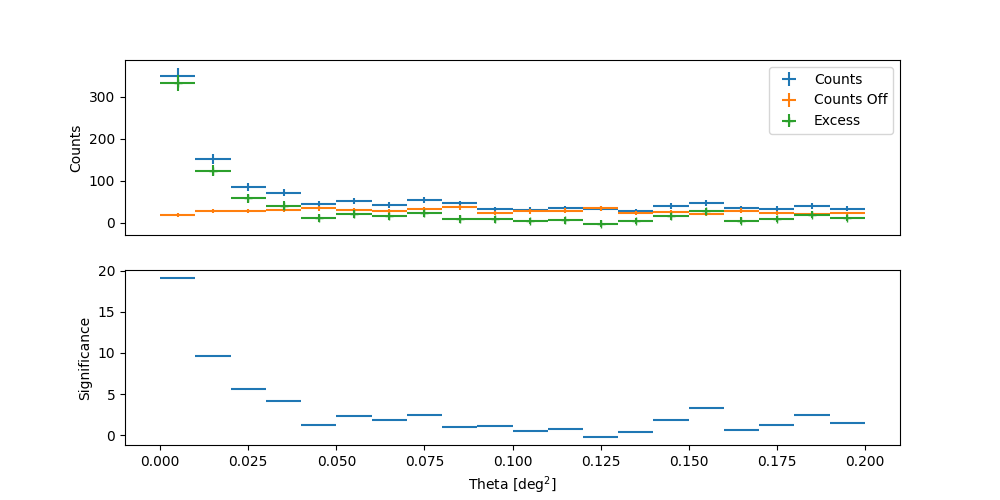
This tutorial explains how to make such a plot, that is the distribution of event counts as a function of the squared angular distance, to a test position.
Setup#
# %matplotlib inline
import matplotlib.pyplot as plt
from astropy.coordinates import SkyCoord
from astropy import units as u
from gammapy.data import DataStore
from gammapy.maps import MapAxis
from gammapy.makers.utils import ThetaSquaredTable
from gammapy.visualization import plot_theta_squared_table
Get some data#
Some data taken on the Crab by H.E.S.S. are used.
data_store = DataStore.from_dir("$GAMMAPY_DATA/hess-dl3-dr1")
observations = data_store.get_observations([23523, 23526])
Define a test position#
Here we define the position of Crab
<SkyCoord (ICRS): (ra, dec) in deg
    (83.6324, 22.0174)>
Creation of the theta2 plot#
By default, the distribution of the OFF counts in squared angular distance is
calculated from the mirror reflected coordinates of the test position, assuming
therefore a single OFF position. However, one can set manually both the
coordinates of the off_position. It is worth to note that overlapping
regions are always forbidden to avoid correlated OFF counts, therefore the
user should take care in the choice of the off_position.
separation = position.separation(observations[0].pointing.fixed_icrs)
position_angle = 180 * u.deg
off_position = position.directional_offset_by(
    position_angle=position_angle, separation=separation * 2
)
print(off_position)
<SkyCoord (ICRS): (ra, dec) in deg
    (83.6324, 21.0114874)>
theta2_axis = MapAxis.from_bounds(0, 0.2, nbin=20, interp="lin", unit="deg2")
theta2_table_maker = ThetaSquaredTable(
    observations=observations,
    position=position,
    theta_squared_axis=theta2_axis,
    position_off=off_position,
)
theta2_table = theta2_table_maker.run()

plt.figure(figsize=(10, 5))
plot_theta_squared_table(theta2_table)
plt.show()
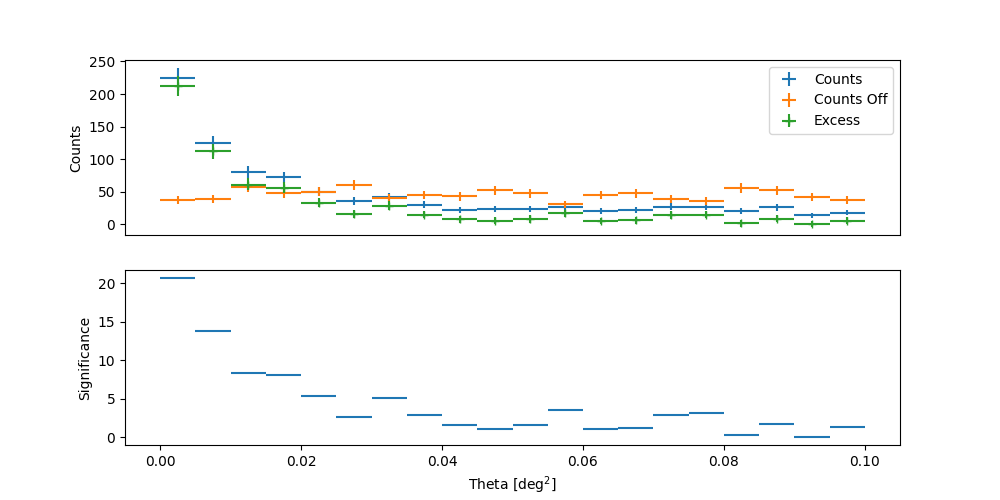
Alternatively, it can be requested a number of reflected OFF positions that will
be calculated through the WobbleRegionsFinder. As mentioned before,
the user should be cautious that the regions (ON and OFF) do not overlap, otherwise
only the mirror reflected region will be adopted as OFF.
off_regions_number = 3
theta2_axis = MapAxis.from_bounds(0, 0.1, nbin=20, interp="lin", unit="deg2")
theta2_table_maker_offreg = ThetaSquaredTable(
    observations=observations,
    position=position,
    theta_squared_axis=theta2_axis,
    off_regions_number=off_regions_number,
)
theta2_table_offreg = theta2_table_maker_offreg.run()

plt.figure(figsize=(10, 5))
plot_theta_squared_table(theta2_table_offreg)
plt.show()
Making a theta2 plot for a given energy range#
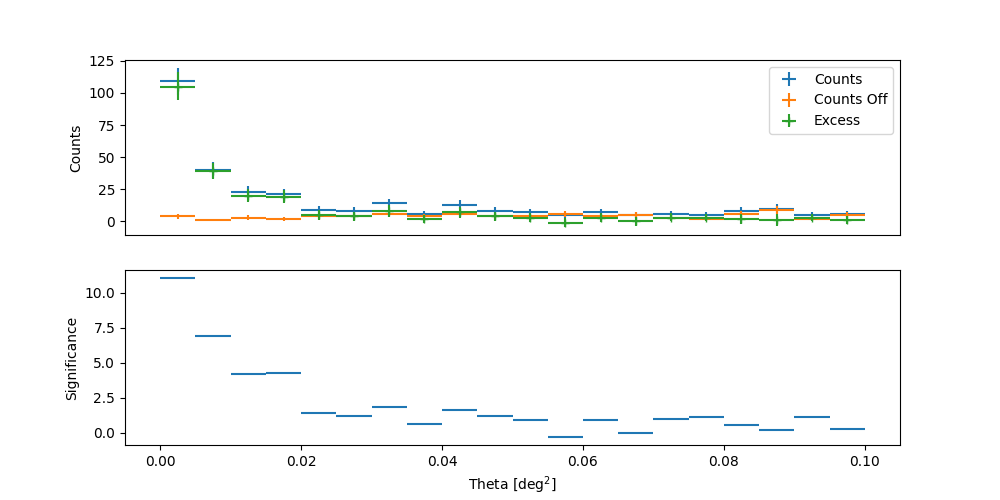
With the function ThetaSquaredTable, one can
also select a fixed energy range.
theta2_table_maker_en = ThetaSquaredTable(
    observations=observations,
    position=position,
    theta_squared_axis=theta2_axis,
    energy_edges=[1.2, 11] * u.TeV,
)
theta2_table_en = theta2_table_maker_en.run()

plt.figure(figsize=(10, 5))
plot_theta_squared_table(theta2_table_en)
plt.show()
Statistical significance of a detection#
To get the significance of a signal, the usual method consists of using the reflected background method (see the maker tutorial: Reflected regions background) to compute the WStat statistics (see WStat : Poisson data with background measurement, Fit statistics). This is the well-known method of [LiMa1983] using ON and OFF regions.
The following tutorials show how to get an excess significance:
