
Note
Go to the end to download the full example code or to run this example in your browser via Binder.
Constraining parameter limits#
Explore how to deal with upper limits on parameters.
Prerequisites#
It is advisable to understand the general Gammapy modelling and fitting framework before proceeding with this notebook, e.g. see Modeling and Fitting (DL4 to DL5).
Context#
Even with significant detection of a source, constraining specific model parameters may remain difficult, allowing only for the calculation of confidence intervals.
Proposed approach#
In this section, we will use 6 observations of the blazar PKS 2155-304, taken in 2008 by H.E.S.S, to constrain the curvature in the spectrum.
Setup#
As usual, let’s start with some general imports…
# %matplotlib inline
import matplotlib.pyplot as plt

import numpy as np
import astropy.units as u
from gammapy.datasets import SpectrumDatasetOnOff, Datasets
from gammapy.modeling import Fit, select_nested_models
from gammapy.modeling.models import SkyModel, LogParabolaSpectralModel
from gammapy.estimators import FluxPointsEstimator
Load observation#
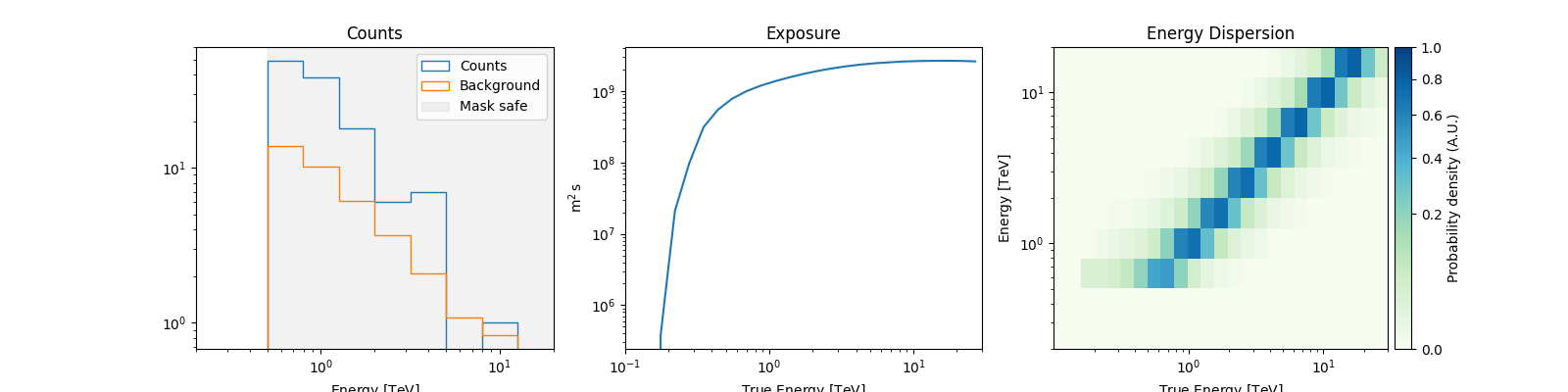
We will use a SpectrumDatasetOnOff to see how to constrain
model parameters. This dataset was obtained from H.E.S.S. observation of the blazar PKS 2155-304.
Detailed modeling of this dataset can be found in the
Account for spectral absorption due to the EBL notebook.
dataset_onoff = SpectrumDatasetOnOff.read(
    "$GAMMAPY_DATA/PKS2155-steady/pks2155-304_steady.fits.gz"
)
dataset_onoff.peek()
plt.show()
Fit spectrum#
We will investigate the presence of spectral curvature by modeling the
observed spectrum using a LogParabolaSpectralModel.
spectral_model = LogParabolaSpectralModel(
    amplitude="5e-12 TeV-1 s-1 cm-2", alpha=2, beta=0.5, reference=1.0 * u.TeV
)

model_pks = SkyModel(spectral_model, name="model_pks")
dataset_onoff.models = model_pks

fit = Fit()
result_pks = fit.run(dataset_onoff)
print(result_pks.models)
DatasetModels

Component 0: SkyModel

  Name                      : model_pks
  Datasets names            : None
  Spectral model type       : LogParabolaSpectralModel
  Spatial  model type       :
  Temporal model type       :
  Parameters:
    amplitude                     :   4.23e-12   +/- 9.5e-13 1 / (TeV s cm2)
    reference             (frozen):      1.000       TeV
    alpha                         :      3.351   +/-    0.35
    beta                          :      0.263   +/-    0.54
We see that the parameter beta (the curvature parameter) is poorly
constrained as the errors are very large.
Therefore, we will perform a likelihood ratio test to evaluate the significance
of the curvature compared to the null hypothesis of no curvature. In the null
hypothesis, beta=0.
LLR = select_nested_models(
    datasets=Datasets(dataset_onoff),
    parameters=[model_pks.parameters["beta"]],
    null_values=[0],
)
print(LLR)
{'ts': np.float64(0.32939559496572635), 'fit_results': <gammapy.modeling.fit.FitResult object at 0x7ff85c1f9370>, 'fit_results_null': <gammapy.modeling.fit.FitResult object at 0x7ff85f785730>}
We can see that the improvement in the test statistic after including the curvature is only ~0.3, which corresponds to a significance of only 0.5.
We can safely conclude that the addition of the curvature parameter does
not significantly improve the fit. As a result, the function has internally updated
the best fit model to the one corresponding to the null hypothesis (i.e. beta=0).
print(dataset_onoff.models)
DatasetModels

Component 0: SkyModel

  Name                      : model_pks
  Datasets names            : None
  Spectral model type       : LogParabolaSpectralModel
  Spatial  model type       :
  Temporal model type       :
  Parameters:
    amplitude                     :   3.85e-12   +/- 5.8e-13 1 / (TeV s cm2)
    reference             (frozen):      1.000       TeV
    alpha                         :      3.405   +/-    0.30
    beta                  (frozen):      0.000
Compute parameter asymmetric errors and upper limits#
In such a case, it can still be useful to be able to constrain the allowed range of the non-significant parameter (e.g.: to rule out parameter values, to compare from theoretical predications, etc.).
First, we reset the alternative model on the dataset:
dataset_onoff.models = LLR["fit_results"].models
parameter = dataset_onoff.models.parameters["beta"]
We can then compute the asymmetric errors and upper limits on the parameter
of interest. It is always useful to ensure that the fit the converged by looking at the
success and message keywords.
res_1sig = fit.confidence(datasets=dataset_onoff, parameter=parameter, sigma=1)
print(res_1sig)
{'success': True, 'message': 'Minos terminated successfully.', 'errp': np.float64(0.8310464830801719), 'errn': np.float64(0.41346440407107254), 'nfev': 126}
We can directly use this to compute \(n\sigma\) upper limits on the parameter:
res_2sig = fit.confidence(datasets=dataset_onoff, parameter=parameter, sigma=2)
ll_2sigma = parameter.value - res_2sig["errn"]
ul_2sigma = parameter.value + res_2sig["errp"]

print(f"2-sigma lower limit on beta is {ll_2sigma:.2f}")
print(f"2-sigma upper limit on beta is {ul_2sigma:.2f}")
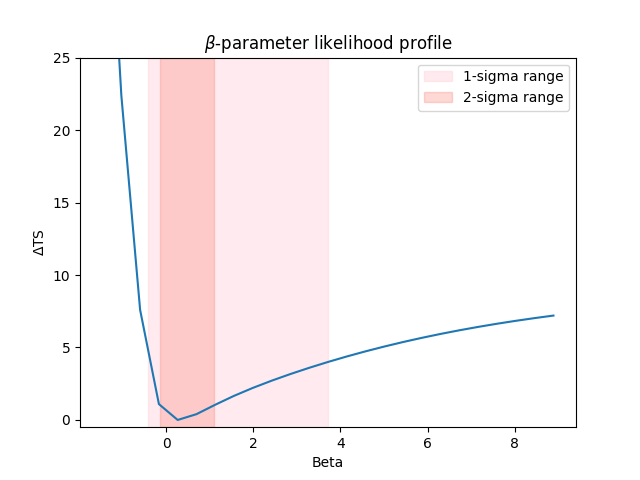
2-sigma lower limit on beta is -0.43
2-sigma upper limit on beta is 3.71
Likelihood profile#
We can also compute the likelihood profile of the parameter.
First we define the scan range such that it encompasses more than the 2-sigma parameter limits.
Then we call stat_profile :
parameter.scan_n_values = 25
parameter.scan_min = parameter.value - 2.5 * res_2sig["errn"]
parameter.scan_max = parameter.value + 2.5 * res_2sig["errp"]
parameter.interp = "lin"
profile = fit.stat_profile(datasets=dataset_onoff, parameter=parameter, reoptimize=True)
The resulting profile is a dictionary that stores the likelihood value and the fit result
for each value of beta.
print(profile)
{'model_pks.spectral.beta_scan': array([-1.4588051 , -1.02776659, -0.59672808, -0.16568956,  0.26534895,
        0.69638746,  1.12742597,  1.55846448,  1.98950299,  2.4205415 ,
        2.85158001,  3.28261852,  3.71365703,  4.14469554,  4.57573405,
        5.00677256,  5.43781107,  5.86884958,  6.29988809,  6.7309266 ,
        7.16196511,  7.59300362,  8.02404213,  8.45508064,  8.88611915]), 'stat_scan': array([50.67137298, 28.40382376, 13.59596178,  7.09723872,  6.00318251,
        6.40313003,  7.05413881,  7.6675433 ,  8.21483666,  8.71182744,
        9.17165555,  9.6013471 , 10.00441683, 10.38274403, 10.73753108,
       11.06974044, 11.38028286, 11.67009235, 11.94014857, 12.1914764 ,
       12.42513409, 12.64219749, 12.84374351, 13.03083462, 13.20450553]), 'fit_results': [<gammapy.modeling.fit.OptimizeResult object at 0x7ff85ede0080>, <gammapy.modeling.fit.OptimizeResult object at 0x7ff85f10f350>, <gammapy.modeling.fit.OptimizeResult object at 0x7ff85fd85a00>, <gammapy.modeling.fit.OptimizeResult object at 0x7ff85c4a3a70>, <gammapy.modeling.fit.OptimizeResult object at 0x7ff85c1aa7b0>, <gammapy.modeling.fit.OptimizeResult object at 0x7ff85f578800>, <gammapy.modeling.fit.OptimizeResult object at 0x7ff85ef90350>, <gammapy.modeling.fit.OptimizeResult object at 0x7ff85c688500>, <gammapy.modeling.fit.OptimizeResult object at 0x7ff85c1aa9f0>, <gammapy.modeling.fit.OptimizeResult object at 0x7ff85ee1eb10>, <gammapy.modeling.fit.OptimizeResult object at 0x7ff85f0bc230>, <gammapy.modeling.fit.OptimizeResult object at 0x7ff85f8ee900>, <gammapy.modeling.fit.OptimizeResult object at 0x7ff85d6d5e50>, <gammapy.modeling.fit.OptimizeResult object at 0x7ff85fb8d9a0>, <gammapy.modeling.fit.OptimizeResult object at 0x7ff85f12e3c0>, <gammapy.modeling.fit.OptimizeResult object at 0x7ff85f71cfe0>, <gammapy.modeling.fit.OptimizeResult object at 0x7ff85d6d6630>, <gammapy.modeling.fit.OptimizeResult object at 0x7ff85ee1eba0>, <gammapy.modeling.fit.OptimizeResult object at 0x7ff85c1fad50>, <gammapy.modeling.fit.OptimizeResult object at 0x7ff85f12c4a0>, <gammapy.modeling.fit.OptimizeResult object at 0x7ff8621a6c00>, <gammapy.modeling.fit.OptimizeResult object at 0x7ff85ef17bf0>, <gammapy.modeling.fit.OptimizeResult object at 0x7ff85f72d100>, <gammapy.modeling.fit.OptimizeResult object at 0x7ff85dc94a10>, <gammapy.modeling.fit.OptimizeResult object at 0x7ff85c34a720>]}
Let’s plot everything together
values = profile["model_pks.spectral.beta_scan"]
loglike = profile["stat_scan"]
ax = plt.gca()
ax.plot(values, loglike - np.min(loglike))
ax.set_xlabel("Beta")
ax.set_ylabel(r"$\Delta$TS")
ax.set_title(r"$\beta$-parameter likelihood profile")
ax.fill_betweenx(
    x1=parameter.value - res_2sig["errn"],
    x2=parameter.value + res_2sig["errp"],
    y=[-0.5, 25],
    alpha=0.3,
    color="pink",
    label="1-sigma range",
)
ax.fill_betweenx(
    x1=parameter.value - res_1sig["errn"],
    x2=parameter.value + res_1sig["errp"],
    y=[-0.5, 25],
    alpha=0.3,
    color="salmon",
    label="2-sigma range",
)
ax.set_ylim(-0.5, 25)
plt.legend()
plt.show()
Impact of the model choice on the flux upper limits#
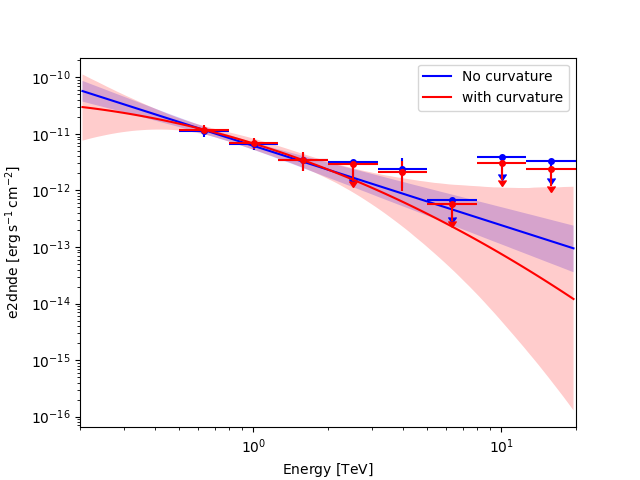
The flux points depends on the underlying model assumption. This can have a non-negligible impact on the flux upper limits in the energy range where the model is not well constrained as illustrated in the following figure. So quote preferably upper limits from the model which is the most supported by the data.
energies = dataset_onoff.geoms["geom"].axes["energy"].edges
fpe = FluxPointsEstimator(energy_edges=energies, n_jobs=4, selection_optional=["ul"])

# Null hypothesis -- no curvature
dataset_onoff.models = LLR["fit_results_null"].models
fp_null = fpe.run(dataset_onoff)

# Alternative hypothesis -- with curvature
dataset_onoff.models = LLR["fit_results"].models
fp_alt = fpe.run(dataset_onoff)
Plot them together
ax = fp_null.plot(sed_type="e2dnde", color="blue")
LLR["fit_results_null"].models[0].spectral_model.plot(
    ax=ax,
    energy_bounds=(energies[0], energies[-1]),
    sed_type="e2dnde",
    color="blue",
    label="No curvature",
)
LLR["fit_results_null"].models[0].spectral_model.plot_error(
    ax=ax,
    energy_bounds=(energies[0], energies[-1]),
    sed_type="e2dnde",
    facecolor="blue",
    alpha=0.2,
)


fp_alt.plot(ax=ax, sed_type="e2dnde", color="red")
LLR["fit_results"].models[0].spectral_model.plot(
    ax=ax,
    energy_bounds=(energies[0], energies[-1]),
    sed_type="e2dnde",
    color="red",
    label="with curvature",
)
LLR["fit_results"].models[0].spectral_model.plot_error(
    ax=ax,
    energy_bounds=(energies[0], energies[-1]),
    sed_type="e2dnde",
    facecolor="red",
    alpha=0.2,
)

plt.legend()
plt.show()
/home/runner/work/gammapy-docs/gammapy-docs/gammapy/.tox/build_docs/lib/python3.12/site-packages/gammapy/modeling/models/spectral.py:649: UserWarning: This axis already has a converter set and is updating to a potentially incompatible converter
  ax.plot(energy.center, flux.quantity[:, 0, 0], **kwargs)
/home/runner/work/gammapy-docs/gammapy-docs/gammapy/.tox/build_docs/lib/python3.12/site-packages/gammapy/maps/region/ndmap.py:154: UserWarning: This axis already has a converter set and is updating to a potentially incompatible converter
  ax.errorbar(
This logic can be extended to any spectral or spatial feature. As an exercise, try to compute the 95% spatial extent on the MSH 15-52 dataset used for the ring background notebook.
